Cloud Security Testing: From the Outside In
Most organisations have moved a significant portion of their infrastructure into the cloud. Microsoft 365, Azure, AWS, and a sprawling set of SaaS platforms now hold the data and identities that make businesses run. The attack surface has shifted with it, and so has the way we test.
Cloud assessments at Tarian Labs follow a structured methodology. Each phase builds on the last, and the findings that come out of them tell a consistent story: organisations grow into cloud environments faster than their security controls keep up.
The phases of a cloud assessment
A cloud penetration test is not a single activity. It moves through distinct phases, each with a different objective and a different set of questions to answer.
External Reconnaissance is where every assessment starts. Before any credentials are used or any systems touched, we look at what is publicly visible about the organisation's cloud footprint. The goal is to understand what an attacker with no access and no inside knowledge could find on their own, because that is exactly what a real attacker would do first.
Exposed Data is often found before a single credential is tested. Misconfigured cloud storage, whether in Azure, AWS, or Google Cloud, can leave internal files, backups, and sensitive documents publicly accessible to anyone who knows where to look. This is one of the most impactful findings we encounter, and it requires no authentication whatsoever.
Credential Attacks follow from reconnaissance. Once we understand the identity landscape, we test whether accounts can be compromised through weak passwords, credential reuse, or authentication mechanisms that do not behave the way an organisation expects. A single valid account changes the nature of the engagement entirely.
Internal Enumeration covers what happens after access is gained. Cloud environments have network controls, VNets, subnets, virtual firewalls and security groups, but these are often secondary to identity. A compromised account with broad permissions can reach data and services that no network rule would have stopped it from touching. This phase maps what a compromised account can actually reach across both identity-based and network-accessible resources.
Lateral Movement and Privilege Escalation tests whether initial access can be extended. In cloud environments this often means finding secrets that open doors to other services, exploiting trust relationships between accounts, or identifying gaps in authentication controls that allow movement through the environment without triggering alerts.
Each phase is relevant because a finding in isolation rarely tells the full story. A misconfigured storage container might not seem critical on its own. But if it contains credentials that allow access to a system with elevated permissions, the combination is a different problem entirely.
What the internet can see
Before we touch an account or a credential, we map what is publicly visible about an organisation's cloud presence. The goal is to understand what an attacker with no access could discover on their own, because that is exactly what a real attacker does first.
Code repositories are one of the most reliable sources of useful information at this stage. Developers regularly commit API keys, connection strings, and service account credentials alongside configuration files, often without realising it. These secrets persist in commit history long after the original developer has moved on. Scanning public repositories for a target organisation frequently surfaces credentials that are still valid, sometimes for production systems.
Identity exposure matters here too. Knowing which user accounts exist within a cloud tenant is the prerequisite for any credential attack. Microsoft's authentication infrastructure will, in many configurations, silently confirm whether a username is valid during the login process. Building a list of confirmed accounts before attempting any login is a low-noise activity that gives an attacker significant advantage before they have touched anything that generates an alert.
Exposed data: buckets, blobs, and what should not be public
One of the most impactful findings in cloud assessments requires no credentials, no exploitation, and no technical sophistication to verify. Misconfigured cloud storage, S3 buckets in AWS, Blob containers in Azure, and equivalent services in Google Cloud, can be left open to the public internet through a single incorrect setting.
The cause is almost always operational rather than malicious. Storage containers are quick to provision and easy to share, which makes them attractive for short-term collaboration. A project team needs to share large files externally, public access gets enabled, the project ends, and the container sits open indefinitely because no one had the visibility or the process to review it. On larger cloud estates, storage containers number in the hundreds, and tracking the access configuration of each one is not something most organisations do consistently.
What we find in these containers varies considerably. On assessments where storage is misconfigured we have encountered database backups containing customer records, archived HR documentation including salary data and personnel files, internal financial reports, deployment packages with embedded credentials, and IT documentation describing internal infrastructure. None of this required logging in. It was reachable by anyone on the internet who looked for it.
The risk here is distinct from other cloud vulnerabilities. There is no attack chain to follow, no authentication to bypass, and often no log entry generated when someone accesses a public container and downloads its contents. An organisation may have had sensitive data sitting publicly accessible for months or years without any indication that it had been accessed.
This is why storage configuration is a dedicated part of our assessments and not simply folded into broader reconnaissance. The findings, when they occur, tend to be significant in their own right, and they sometimes contain the credentials or configuration details that inform the rest of the engagement.
Getting in: credential attacks
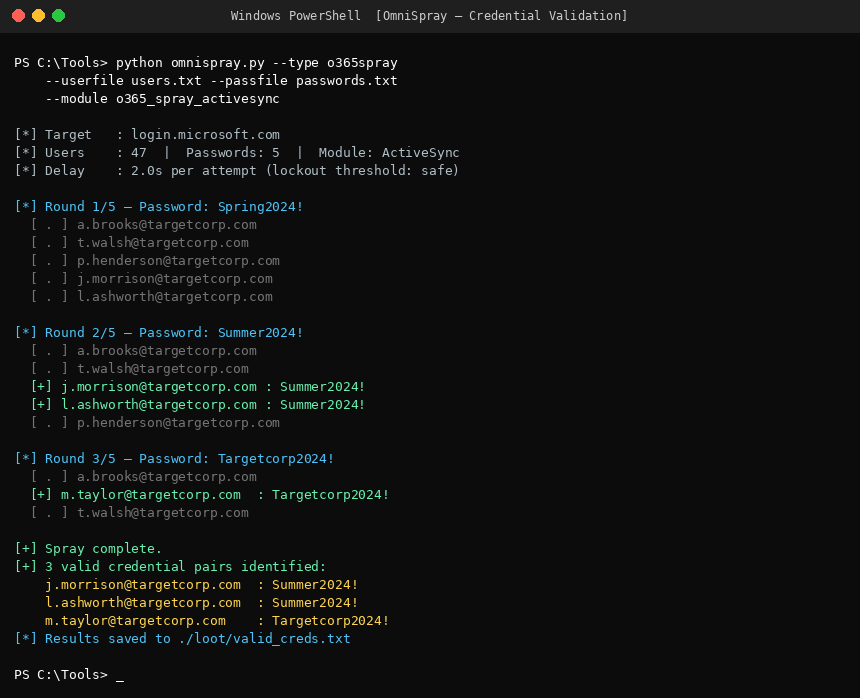
With a confirmed list of accounts, the question becomes whether any of them can be accessed. Password spraying is the standard approach. Rather than targeting one account with many passwords, we try a small number of commonly used passwords across a large number of accounts, specifically to stay below the thresholds that trigger lockouts or alerts. Passwords tied to the season, year, or company name remain common, and they work often enough to be worth trying methodically.
The more interesting dynamic in Microsoft 365 environments is what happens at the authentication layer. Modern tenants are configured to require multi-factor authentication on sign-in, but many organisations have not fully closed off older authentication methods that predate MFA. These legacy protocols, used historically by older mail clients and mobile devices, often bypass MFA requirements entirely. A password that would prompt for a second factor through the normal browser login will authenticate silently through one of these older pathways if the tenant has not explicitly blocked them.
This is not a sophisticated attack. It does not require specialised access or unusual tooling. It requires knowing that the gap exists and knowing where to look for it. When it works, the result is authenticated access to a cloud account in an environment where the organisation believes MFA is protecting them.
What lives inside
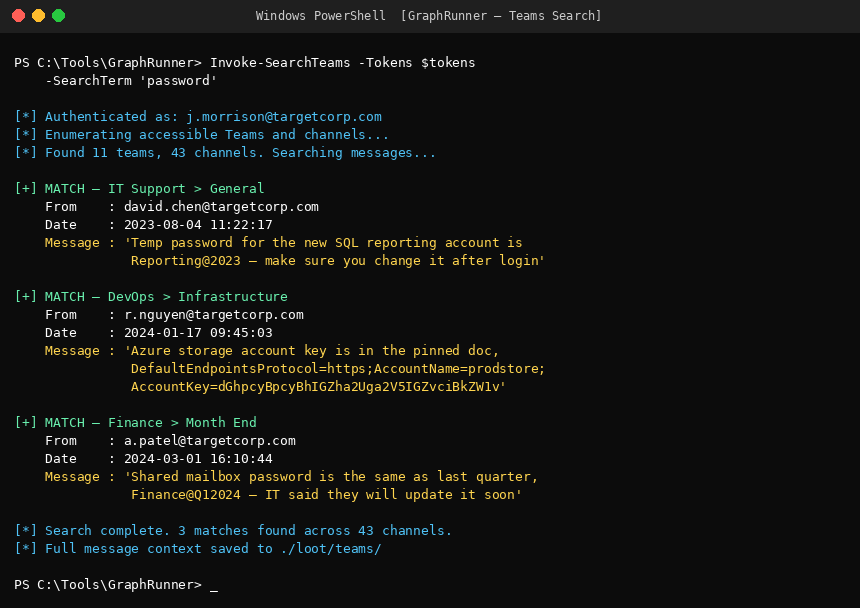
Once inside a tenant, the question is what a compromised account can actually access. The answer is consistently broader than organisations expect. Cloud environments do have network controls: Azure VNets, Network Security Groups, AWS Security Groups, virtual firewalls, and subnet segmentation are all real and can be well-configured. But these controls govern traffic between systems. They do not govern what an authenticated identity is permitted to read, download, or interact with through a service's own API.
In Microsoft 365 environments, a standard user account typically has read access to a significant portion of the organisation's SharePoint estate, Teams conversations, and shared files. No network rule prevents this because no network boundary exists between the user and those services. The security question is whether permissions have been scoped correctly, and whether sensitive content has accumulated in places that are broadly accessible by default.
The approach here is systematic. We search across Teams, SharePoint, and OneDrive for content that should not be broadly accessible: infrastructure documentation with server details and credentials, exported password lists saved to a shared drive for convenience, configuration files uploaded during a deployment project containing API keys or database connection strings, and informal Teams conversations where sensitive information was shared and never cleaned up. None of this requires exploiting a vulnerability. It is all accessible through the same interfaces a legitimate user would use.
The pattern we see repeatedly is that sensitive information accumulates in collaborative platforms over time, and no one is actively reviewing what is stored there or who can access it. A file uploaded three years ago during an onboarding project may contain credentials that are still in use. A Teams channel from a decommissioned project may still hold access details for systems that are very much active.
Moving further: MFA gaps and token abuse
Multi-factor authentication stops a significant proportion of account compromises, but it is not uniformly effective. The way it is deployed determines how effective it actually is.
The most common gap is legacy authentication, already mentioned above. But there is a second pattern worth understanding, particularly because it works even in environments where legacy protocols have been correctly disabled.
Device code phishing exploits a legitimate part of the Microsoft authentication flow designed for devices that do not have a browser, such as certain printers or shared terminals. When a user authenticates via this flow, they are given a short code and directed to a Microsoft-hosted page to complete login. An attacker can initiate this flow and send the resulting code to a target with a plausible pretext: an IT support request, an internal notification, a link that looks like a legitimate system prompt. The target logs in normally, completes their MFA challenge on their own device, and in doing so grants the attacker a valid authentication token.
This is significant for two reasons. First, it bypasses MFA without compromising the user's credentials or their second factor. The user does everything correctly. Second, the tokens obtained through Microsoft's authentication system have long lifetimes by default. An access token may expire after an hour, but the refresh token sitting behind it can silently obtain new access tokens for days or weeks without any additional user interaction.
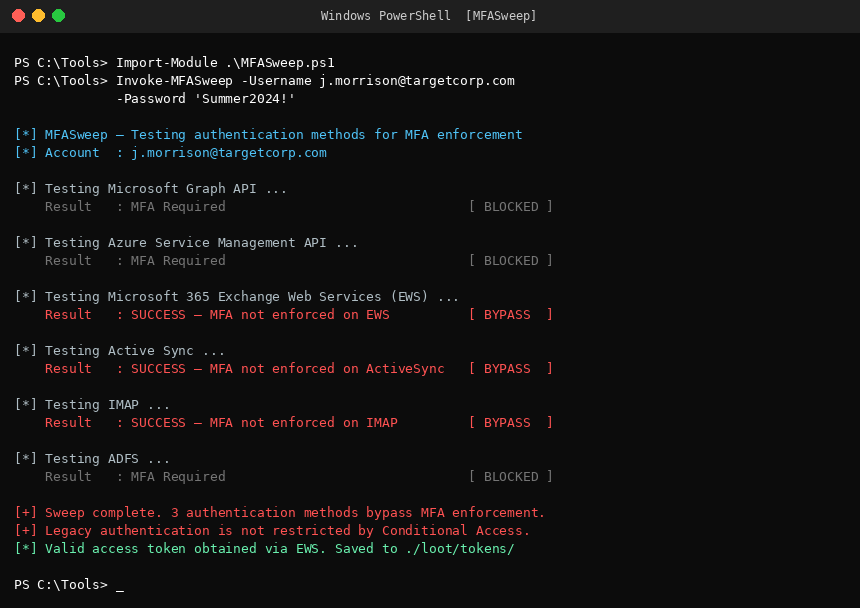
In cloud environments, lateral movement rarely looks like the traditional version. There is no jumping between machines, no escalation through local administrator accounts. It is a quieter process: a token that allows reading a mailbox, which contains a shared credential, which accesses a storage account, which holds a service account certificate, which carries contributor-level access to a production environment. Each step is a legitimate API call. None of it generates the kind of alert that organisations are typically monitoring for.
Why this matters
Cloud environments are not inherently less secure than on-premise infrastructure, but the security model is different. The controls that protect a traditional network, perimeter firewalls, network segmentation, host-based monitoring, do not translate directly. In the cloud, identity is the perimeter. When identity controls have gaps, the blast radius from a single compromised account can be far larger than expected.
The findings that matter most in cloud assessments come from the connections between things: the exposed file that contains credentials, the credential that bypasses an MFA control, the token that reaches further than anyone assumed. The individual pieces might each appear manageable. It is the chain that represents the real risk.
Tarian Labs conducts cloud assessments across Microsoft 365, Azure, and AWS environments. If your organisation has grown its cloud footprint quickly and security controls have not kept pace, the gap between what you assume is protected and what is actually accessible is worth understanding before someone else finds it.
If your cloud environment has grown quickly, the gap between what you assume is protected and what is actually accessible is worth understanding.
Get in touch to talk through a cloud assessment scoped to your environment.