From Terraform to a Terrible Day
Assumed breach asks a simple question. One of your developers clicks the wrong link on a Monday morning, and the attacker is now sitting inside your cloud with their account. What do they walk away with? Normally the answer is bounded by what that developer was allowed to do. This engagement was not normal.
The environment was an Azure development subscription hosting several applications along with their APIs and backing database services. On the face of it, reasonably well built. Private storage containers, a SQL firewall, nothing anonymously accessible.
The file that was never meant to be read
While browsing through the files a developer account could reach in the storage blobs, we found a Terraform state file. Inside it were the keys to the doors of a number of otherwise locked down services.
State is supposed to be a record of what got deployed. In practice it also keeps a copy of everything that passed through the deployment, including the values you marked as sensitive. This one had storage keys, SQL credentials, App Service publishing credentials, App Configuration keys, monitoring keys, and the signing key the applications used for their own auth tokens.
Keeping state in a blob container is the normal way to do this. It is how a team shares state and stops two people running apply at the same time. Nobody here had done anything exotic. The problem was what the file carried, and how little stood between a developer account and reading it.
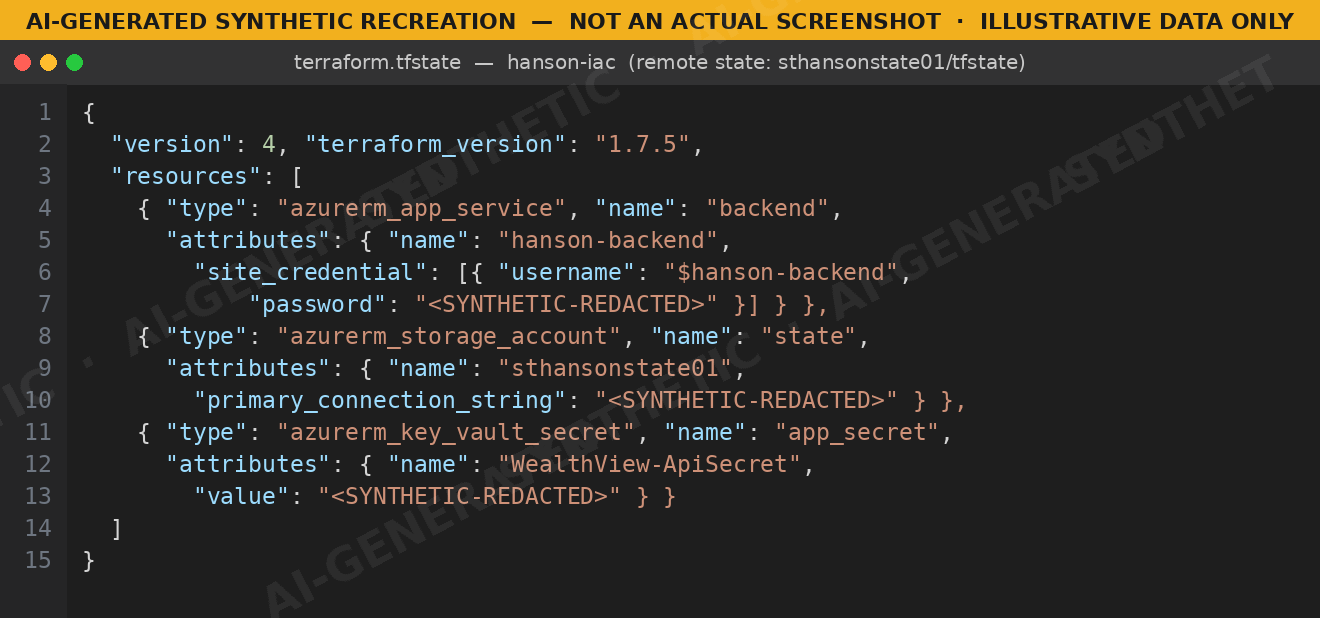
State readable by a developer account, full of live secrets.
Do the keys still work without the account?
So we had a pile of credentials. The question was whether they still worked, and whether they were worth anything without the account we found them with. It matters, because a credential that only works while you are signed in as that developer is a far smaller problem.
We kept a third test account for exactly this, with no role in the subscription at all. It could not list a single resource. Every management plane request came back 403. We then handed the storage key straight to the data plane and it listed private containers quite happily. Public access was off the whole time. The key did that by itself.
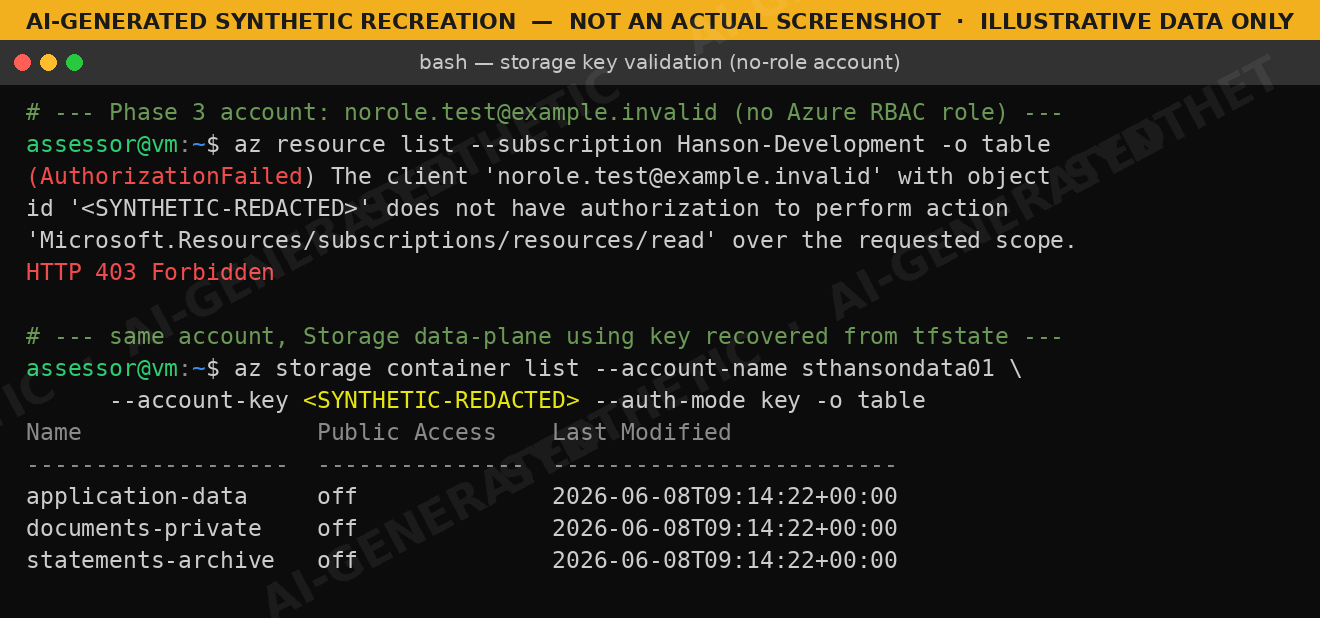
No permissions, no problem, as long as you have the key.
From the deployment into the app
Same story with the publishing credentials. Kudu is the console that sits behind every App Service, and it will give you the deployed file system if you can authenticate to it. It turned us away anonymously, then accepted the username and password from state, and from there we pulled the deployed application out of wwwroot.
That is where it compounds. appsettings.json was sitting in wwwroot with a SQL connection string and a JWT signing key that had never appeared in the state file. Reaching the app handed us a second layer of secrets we could not see from the infrastructure.
appsettings.json is part of the build. It ships with the application, so whatever gets written into it travels wherever the app is deployed. Anyone who can read the file system can read the file.
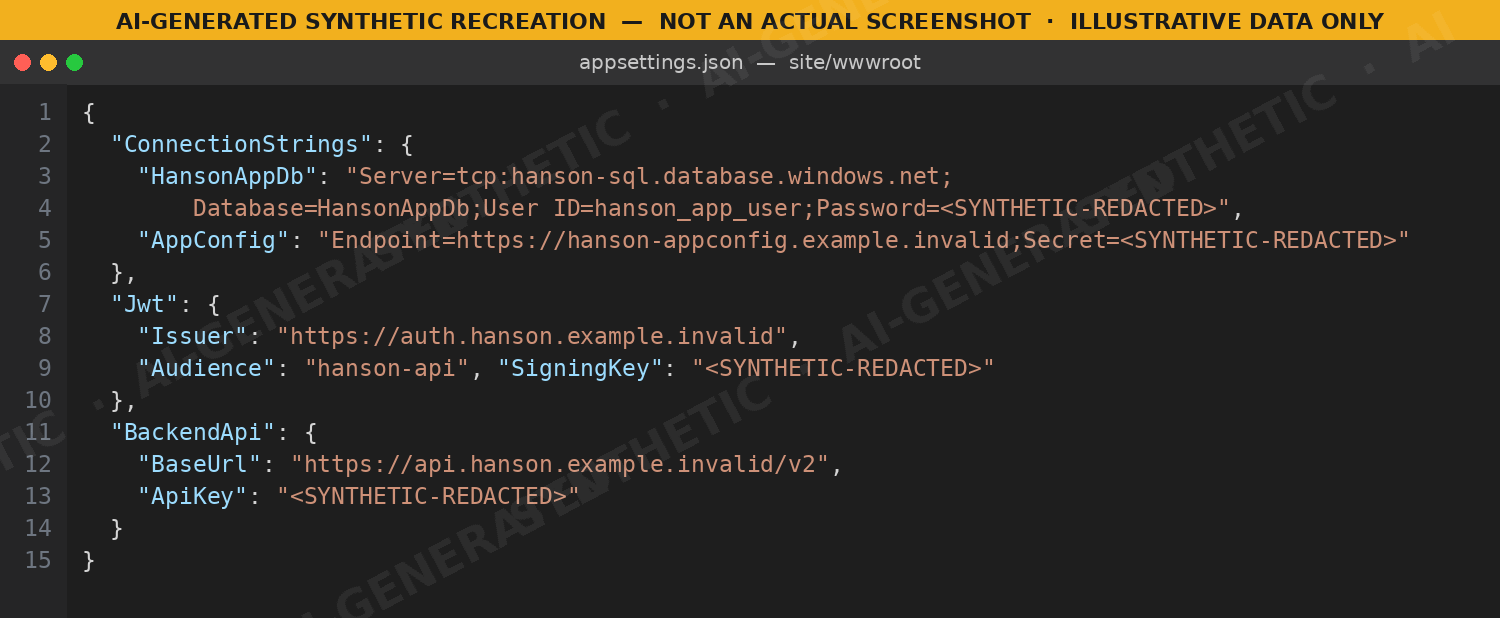
New credentials, one layer down.
Signing our own tokens
The signing key was the fun one. We decompiled the deployed assemblies to confirm how the app used it, rebuilt the token generation in a script, and started issuing our own tokens. The authorization service took them.
We never got past the application's own permission checks. That is less reassuring than it sounds. The app trusted whatever identity the token carried and then checked what that identity could do. We were holding the key it used to verify tokens, so we could put any identity we liked inside one.
Anyone holding that key can present as any user the application knows about, without ever touching a password or an account. They can carry on doing it until somebody rotates the key, and rotating it logs out every genuine user at the same time.
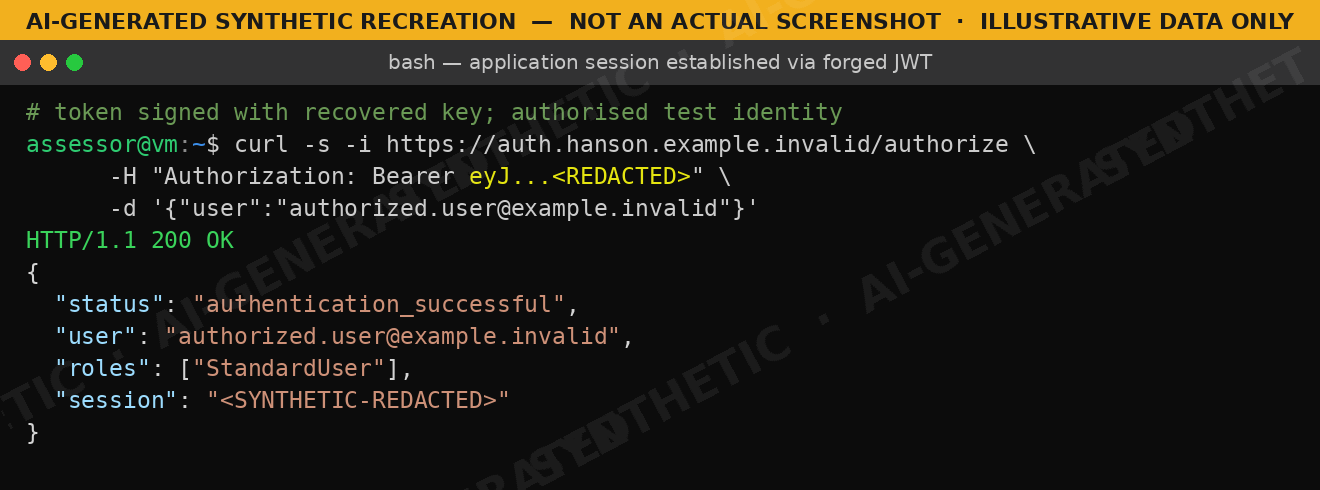
Our token, their session.
Five boundaries, one file
Five boundaries from one file: infrastructure, storage data plane, deployment, database, application trust. There was no master credential anywhere in this. Each step just gave us what we needed for the next one.
Go back to the question at the top. One developer clicking a bad link gave up the storage accounts, the databases, the deployment pipeline and the ability to issue identities the application would trust. The developer was never granted any of it. They just had read access to the wrong file.
Here is the part that changes your remediation plan. None of it gets fixed by disabling the developer account. These secrets work no matter who is holding them, so you are not revoking access, you are rotating credentials, and until you have finished rotating, the door is still open.
What we would tell you to do
- Rotate all of it. Storage keys, publishing profiles, SQL passwords, config keys, signing material. Kill any tokens signed with the old key.
- Use managed identities wherever the service supports them, so there is less lying around to leak.
- Keep application secrets in Key Vault and fetch them at runtime, rather than shipping them inside the deployment.
- Alert on state blob downloads. Nobody should be pulling that file by hand.
Then retest. "We rotated it" and "the old credentials no longer work" are not the same statement.
If you deploy Azure with Terraform and nobody has looked at what ends up in state, that is a decent place for us to start.
Real engagement, real attack chain. The client, application, infrastructure, accounts and credentials are all invented, and every screenshot is a synthetic recreation containing no client data.
Find out what your Terraform state is holding.
A scoping call takes thirty minutes and ends with a fixed-price proposal. No automated scans, no guesswork.